
A customer in Jeddah types “dentist near me” into Google and a list of clinics appears almost at once. Google didn’t go looking for those clinics when they pressed enter. It had already found their pages, read them and stored them. Knowing how that process works tells you exactly what your own website needs before it can show up.
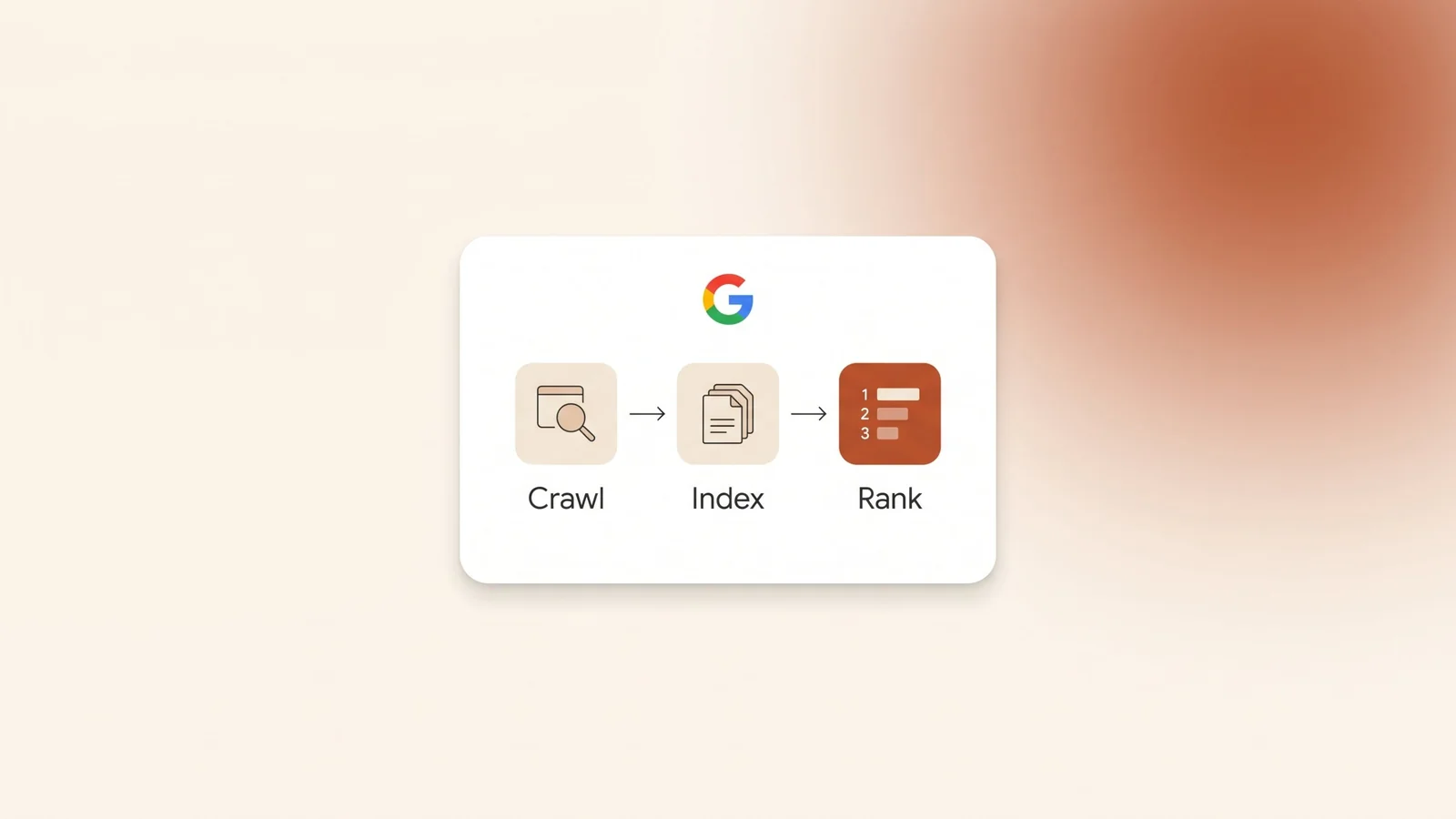
The short answer: Google Search works in three stages. First, Googlebot crawls the web, finding pages through links and sitemaps and downloading them. Second, Google indexes each page: it reads the content, picks one version of duplicate pages and stores it. Third, when someone searches, Google ranks the indexed pages by meaning, relevance, quality, usability and context such as location and language. No one can pay for organic positions, and no stage is guaranteed.
How does Google Search work?
Google Search is a fully automated search engine. Its programs explore the web on their own, and Google says the vast majority of pages in its results were never manually submitted by anyone.
The work happens in three stages: crawling, indexing and serving results. Not every page passes all three. A page can be crawled and never indexed, or indexed and rarely shown.
Most of the work happens before anyone searches. When a customer types a search, Google is not visiting websites live. It looks up pages it has already collected in its index. Google compares that index to the index at the back of a book, with an entry for every word on every page it has stored. It covers hundreds of billions of web pages.
Money doesn’t change any of this. Google says it doesn’t accept payment to crawl a site more often or to rank it higher. Ads are a separate product, sold through Google Ads and labelled as ads in the results.
Stage 1: How does Google find your pages?
Crawling is the stage where Google finds pages and downloads them. There is no central list of every page on the web, so Google has to keep looking for new and updated pages. Google calls this URL discovery.
Google finds pages in three ways:
- Revisiting pages it already knows, to check for changes.
- Following links from known pages to new ones. A new service page linked from your homepage gives Google a path to it. A page nothing links to has no path.
- Reading a sitemap: a file you submit that lists the pages you want Google to know about.
The program that does the fetching is called Googlebot. An algorithm decides which sites it crawls, how often, and how many pages it fetches from each. Googlebot also tries not to overload your server. If your site starts returning server errors (the 500 kind), Google slows down.
Google renders each page with a recent version of Chrome, much like a browser does. That lets it run JavaScript and see content that loads through it.
Some pages never get crawled. The usual reasons are a server that is down or failing, a network problem, a robots.txt rule that blocks Googlebot, or content that sits behind a login. After any launch or redesign, check that nothing from the test version is still blocking Google.
Stage 2: What happens when Google indexes a page?
Indexing is the stage where Google works out what a page is about and stores it. Google reads the text and key elements such as the title, image alt text, images and videos.
Google also sorts out duplicates. When several pages have the same or very similar content, Google groups them and picks one as the canonical: the version that may appear in search results. The others become alternate versions. If your site shows the same page at several addresses, Google chooses which one to show, unless you make the choice clear.
For the chosen page, Google records signals such as its language, the country it is local to and how usable it is. Google uses these signals later, when it decides who to show the page to. That is one reason an Arabic page needs real Arabic content. Our guide to Arabic SEO covers how to write it.
Google indexes the mobile version of your site. In Google’s words, it “uses the mobile version of a site’s content, crawled with the smartphone agent, for indexing and ranking.” Content that appears on your desktop pages but not on your mobile pages is not in the version Google indexes.
Indexing is not guaranteed. Google lists the common reasons a page stays out: low-quality content, a robots meta rule (such as noindex) that blocks indexing, and a site design that makes indexing difficult.
Stage 3: How does Google rank the results?
Ranking happens when someone searches. Google checks its index for matching pages and returns the ones it considers the highest quality and most relevant. Ranking is done programmatically, by automated systems, not by people choosing sites.
Google describes five main factors its systems look at:
| Factor | What Google looks at | What it means for your site |
|---|---|---|
| Meaning of the query | What the search is really asking, including spelling mistakes and synonyms. | Google can match “adjust” with “change”, but your page still has to cover what the searcher means. |
| Relevance | Whether the page holds the information searched for, for example the search words in its headings or body text. | Each service needs a page that names it clearly and explains it. Repeating a keyword hundreds of times doesn’t help. |
| Quality | Signals of expertise, authoritativeness and trustworthiness, such as other prominent websites linking to the content. | Real, accurate information, a clear business behind it, and links from real sites. |
| Usability | When other signals are similar, content people find more accessible may perform better, such as pages that work on mobile and load quickly. | A fast, mobile-friendly site can win a close contest. |
| Context and settings | The searcher’s location, past searches and search settings. | Pages for the cities you serve, and a complete Google Business Profile, matter for local searches. |
Summarised from Google’s own “How Search works” pages. Each factor is made up of many signals.
Behind these factors sit many named ranking systems, listed in Google’s guide to its ranking systems. A few explain behaviour you will notice:
- RankBrain and BERT help Google understand how words relate to concepts and how combinations of words express different meanings. This is why a page can rank for a search it never uses word for word.
- Link analysis systems, including PageRank, study how pages link to each other to understand what they are about.
- Freshness systems show newer content for searches that call for it.
- Site diversity: Google generally won’t show more than two listings from the same site in its top results.
- Spam detection systems, including SpamBrain, deal with content and behaviour that break Google’s spam policies.
Google also says it runs hundreds of thousands of experiments every year and uses feedback from its search quality raters to refine its systems. Rankings can move because the systems change, not only because your site or your competitors changed.
Usability is the factor you control most directly. Our guide to website speed and Core Web Vitals shows what to measure.
Why do two people see different results for the same search?
Google’s help page lists the reasons: time, location, language, device type and, when it is switched on, personalisation based on the searcher’s Google Account and search history.
Google gives its own examples. A search for “bicycle repair shops” shows different results in Paris than in Hong Kong. A search for “football” can mean American football in Chicago and soccer in London.
In Saudi Arabia this has a practical effect. Someone searching “محامي” on a phone in Jeddah and someone searching “lawyer” on a laptop in Riyadh can see different businesses. Checking your ranking from your own office and phone only tells you what you see. Your history matters too: Google can bring a page you have visited many times to the top of your own results.
The layout of the results changes as well. Google notes that “bicycle repair shops” usually shows local results and no images, while “modern bicycle” is more likely to show images. For a local search, Google often shows the local pack: the map and three business listings above the organic results. That part comes from your Google Business Profile, not your website. Our guide on how to rank on Google Maps in Saudi Arabia covers it.
Where can each stage go wrong?
When a page doesn’t show up, the problem sits in one of the three stages. Work through them in order.
| Stage | What Google does | What usually goes wrong | Where to check |
|---|---|---|---|
| Crawling | Finds and downloads pages. | No links point to the page, the server returns errors, robots.txt blocks Googlebot, or the content sits behind a login. | URL Inspection tool and a submitted sitemap in Search Console. |
| Indexing | Reads pages, groups duplicates and stores the canonical version. | A noindex tag left on, thin or duplicate content, or content missing from the mobile version. | The Page indexing report and URL Inspection tool in Search Console. |
| Ranking | Picks the best pages for each search. | The page doesn’t answer the search, trust signals are weak, or the page is hard to use on a phone. | The Performance report in Search Console: impressions and clicks for each search. |
A page that is indexed but never appears usually has a ranking problem, not a technical one.
Where do AI Overviews fit in?
AI Overviews and AI Mode are part of Google Search, and they don’t have a separate entry process. Google says there are no additional requirements to appear in them, and no special optimisation is needed. To be shown as a supporting link, a page must be indexed and eligible to appear in Google Search with a snippet.
Google explains that these features may use “query fan-out”: they run several related searches across subtopics to build one answer. That can bring up a wider set of pages than a classic search does.
So the three stages still decide everything. A page has to be crawled, indexed and clearly the best answer to a question before any AI feature can pick it. Google says SEO best practices remain relevant for AI features.
How can you check what Google sees on your site?
Google Search Console is Google’s free tool for site owners. It shows how Google crawls, indexes and shows your pages.
- Verify your site in Search Console. Add your domain and prove you own it.
- Submit your sitemap. It gives Google a list of the pages you want found.
- Inspect your key pages. The URL Inspection tool shows whether a page is on Google, which version Google chose as canonical, and any crawling or indexing problems. Its live test fetches the page in real time.
- Fix, then request indexing. Fix the problem, confirm it with the live test, then click “Request indexing”. Google says a request doesn’t guarantee indexing, there is a daily limit, and indexing can take up to a week or two. For many pages at once, submit an updated sitemap instead.
- Make sure you aren’t hiding pages by mistake. robots.txt manages crawler traffic. Google says it is not a mechanism for keeping a page out of Google. To keep a page out, use noindex or a password. And check the reverse: your important pages must not carry a noindex tag.
- Read the Performance report. Searches where you get many impressions but few clicks point to pages worth improving.
What do people get wrong about Google Search?
- “You can pay Google to rank higher.” Organic positions aren’t for sale. Ads are a separate, labelled product.
- “You must submit your site to Google.” Most pages are found by crawling links. A sitemap and Search Console help Google find your pages and give you data, but they aren’t an entry ticket.
- “Blocking a page in robots.txt removes it from Google.” It doesn’t. Use noindex for pages that must stay out.
- “Once a page ranks, it stays there.” Google keeps testing and changing its systems, and competitors keep publishing.
- “Everyone sees the same results.” Location, language, device and search history all change what each person sees.
Frequently asked questions
How long does it take Google to index a new page?
There is no fixed time. When you request indexing in Search Console, Google says it can take up to a week or two, and indexing is never guaranteed. A page that is linked from your other pages and listed in your sitemap gives Google more ways to find it.
Why is my website not showing on Google?
Check the three stages in order. Google may not have found the page, because nothing links to it and it isn’t in a sitemap. It may not be indexed, because of a noindex tag or low-quality or duplicate content. Or it may be indexed but not ranking for the searches you tried. The URL Inspection tool in Search Console tells you which.
Does Google treat Arabic pages differently from English pages?
Arabic pages go through the same three stages. Google records each page’s language as a signal and aims to show results in the searcher’s language. An Arabic page needs real Arabic content written for the words Arabic searchers use, not a copy of the English page.
Can I pay Google to appear first?
Not in the organic results. Google says it doesn’t accept payment to rank pages higher. You can pay for ads through Google Ads, which appear in ad positions and are labelled as ads.
Does my Google Business Profile affect Google Search?
For local searches, yes. Your Google Business Profile is the free Google listing that controls how a business appears on Google Maps and in the local pack. Your website competes in the organic results and your profile competes in the local pack, and both can appear on the same results page.
The bottom line
Google Search works in three stages. Googlebot finds and downloads pages, Google indexes the pages it can understand, and its ranking systems pick the best pages for each search based on meaning, relevance, quality, usability and context. Your website has to pass all three: reachable, indexable, and the clearest answer to the searches your customers make.
To see how these stages fit into the full work of SEO, read our guide on what SEO is. Kyvo Media does this work as part of our SEO service, in Arabic and English. Book a free audit and we’ll check how Google crawls, indexes and ranks your site.